HTTP+DB+Redis+Logging
Let's look at a relatively complete example that includes several commonly used core components for tracing. The example code is available at: https://github.com/gogf/gf/tree/master/example/trace/http_with_db
Client
package main

import (
    "github.com/gogf/gf/contrib/trace/otlphttp/v2"
    "github.com/gogf/gf/v2/database/gdb"
    "github.com/gogf/gf/v2/frame/g"
    "github.com/gogf/gf/v2/net/ghttp"
    "github.com/gogf/gf/v2/net/gtrace"
    "github.com/gogf/gf/v2/os/gctx"
)

const (
    serviceName = "otlp-http-client"
    endpoint    = "tracing-analysis-dc-hz.aliyuncs.com"
    path        = "adapt_******_******/api/otlp/traces" )

func main() {
    var ctx = gctx.New()
    shutdown, err := otlphttp.Init(serviceName, endpoint, path)
    if err != nil {
        g.Log().Fatal(ctx, err)
    }
    defer shutdown()

    StartRequests()
}

func StartRequests() {
    ctx, span := gtrace.NewSpan(gctx.New(), "StartRequests")
    defer span.End()

    var (
        err    error
        client = g.Client()
    )
    // Add user info.
    var insertRes = struct {
        ghttp.DefaultHandlerResponse
        Data struct{ Id int64 } `json:"data"`
    }{}
    err = client.PostVar(ctx, "http://127.0.0.1:8199/user/insert", g.Map{
        "name": "john",
    }).Scan(&insertRes)
    if err != nil {
        panic(err)
    }
    g.Log().Info(ctx, "insert result:", insertRes)
    if insertRes.Data.Id == 0 {
        g.Log().Error(ctx, "retrieve empty id string")
        return
    }

    // Query user info.
    var queryRes = struct {
        ghttp.DefaultHandlerResponse
        Data struct{ User gdb.Record } `json:"data"`
    }{}
    err = client.GetVar(ctx, "http://127.0.0.1:8199/user/query", g.Map{
        "id": insertRes.Data.Id,
    }).Scan(&queryRes)
    if err != nil {
        panic(err)
    }
    g.Log().Info(ctx, "query result:", queryRes)

    // Delete user info.
    var deleteRes = struct {
        ghttp.DefaultHandlerResponse
    }{}
    err = client.PostVar(ctx, "http://127.0.0.1:8199/user/delete", g.Map{
        "id": insertRes.Data.Id,
    }).Scan(&deleteRes)
    if err != nil {
        panic(err)
    }
    g.Log().Info(ctx, "delete result:", deleteRes)
}
Brief explanation of the client code:
- First, the client needs to initialize
Jaegervia thejaeger.Initmethod. - In this example, we send
3requests to the server via HTTP client:/user/insertis used to add a new user and returns the user's ID upon success./user/queryis used to query users using the user ID returned from the previous interface./user/deleteis used to delete users using the user ID returned from the previous interface.
Server
package main

import (
    "context"
    "fmt"
    "time"

    "github.com/gogf/gf/contrib/trace/otlphttp/v2"
    "github.com/gogf/gf/v2/database/gdb"
    "github.com/gogf/gf/v2/frame/g"
    "github.com/gogf/gf/v2/net/ghttp"
    "github.com/gogf/gf/v2/os/gcache"
    "github.com/gogf/gf/v2/os/gctx"
)

type cTrace struct{}

const (
    serviceName = "otlp-http-client"
    endpoint    = "tracing-analysis-dc-hz.aliyuncs.com"
    path        = "adapt_******_******/api/otlp/traces" )

func main() {
    var ctx = gctx.New()
    shutdown, err := otlphttp.Init(serviceName, endpoint, path)
    if err != nil {
        g.Log().Fatal(ctx, err)
    }
    defer shutdown()

    // Set ORM cache adapter with redis.
    g.DB().GetCache().SetAdapter(gcache.NewAdapterRedis(g.Redis()))

    // Start HTTP server.
    s := g.Server()
    s.Use(ghttp.MiddlewareHandlerResponse)
    s.Group("/", func(group *ghttp.RouterGroup) {
        group.ALL("/user", new(cTrace))
    })
    s.SetPort(8199)
    s.Run()
}

type InsertReq struct {
    Name string `v:"required#Please input user name."`
}
type InsertRes struct {
    Id int64
}

// Insert is a route handler for inserting user info into database.
func (c *cTrace) Insert(ctx context.Context, req *InsertReq) (res *InsertRes, err error) {
    result, err := g.Model("user").Ctx(ctx).Insert(req)
    if err != nil {
        return nil, err
    }
    id, _ := result.LastInsertId()
    res = &InsertRes{
        Id: id,
    }
    return
}

type QueryReq struct {
    Id int `v:"min:1#User id is required for querying"`
}
type QueryRes struct {
    User gdb.Record
}

// Query is a route handler for querying user info. It firstly retrieves the info from redis,
// if there's nothing in the redis, it then does db select.
func (c *cTrace) Query(ctx context.Context, req *QueryReq) (res *QueryRes, err error) {
    one, err := g.Model("user").Ctx(ctx).Cache(gdb.CacheOption{
        Duration: 5 * time.Second,
        Name:     c.userCacheKey(req.Id),
        Force:    false,
    }).WherePri(req.Id).One()
    if err != nil {
        return nil, err
    }
    res = &QueryRes{
        User: one,
    }
    return
}

type DeleteReq struct {
    Id int `v:"min:1#User id is required for deleting."`
}
type DeleteRes struct{}

// Delete is a route handler for deleting specified user info.
func (c *cTrace) Delete(ctx context.Context, req *DeleteReq) (res *DeleteRes, err error) {
    _, err = g.Model("user").Ctx(ctx).Cache(gdb.CacheOption{
        Duration: -1,
        Name:     c.userCacheKey(req.Id),
        Force:    false,
    }).WherePri(req.Id).Delete()
    if err != nil {
        return nil, err
    }
    return
}

func (c *cTrace) userCacheKey(id int) string {
    return fmt.Sprintf(`userInfo:%d`, id)
}
Brief explanation of the server code:
- First, the client also needs to initialize
Jaegervia thejaeger.Initmethod. - In this example, we use database and database cache features to demonstrate tracing for both
ORMandRedis. - At program startup, we set the adapter of the current database cache management to
redisusing the following method. For those interested in cache adapter introductions, please refer to the Caching - Interface section.
g.DB().GetCache().SetAdapter(gcache.NewAdapterRedis(g.Redis()))
- In
ORMoperations, theCtxmethod needs to be used to pass the context variable to the component. Theormcomponent automatically recognizes if the current context contains tracing information and enables tracing features if it does. - In
ORMoperations, theCachemethod is used here to cache query results toredis, and in delete operations, theCachemethod is also used to clear the cache results inredis. For introductions toORMcache management, please refer to ORM Model - Query Cache section.
View Results
Start the server:
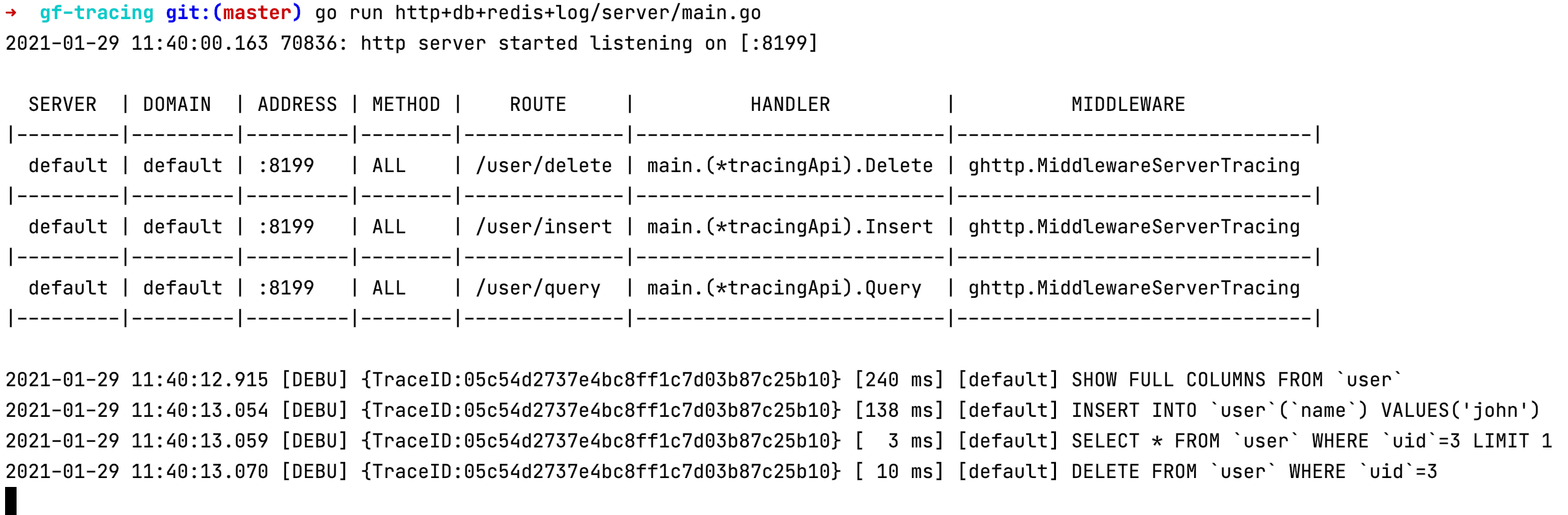
Start the client:

View the tracing information in Jaeger:
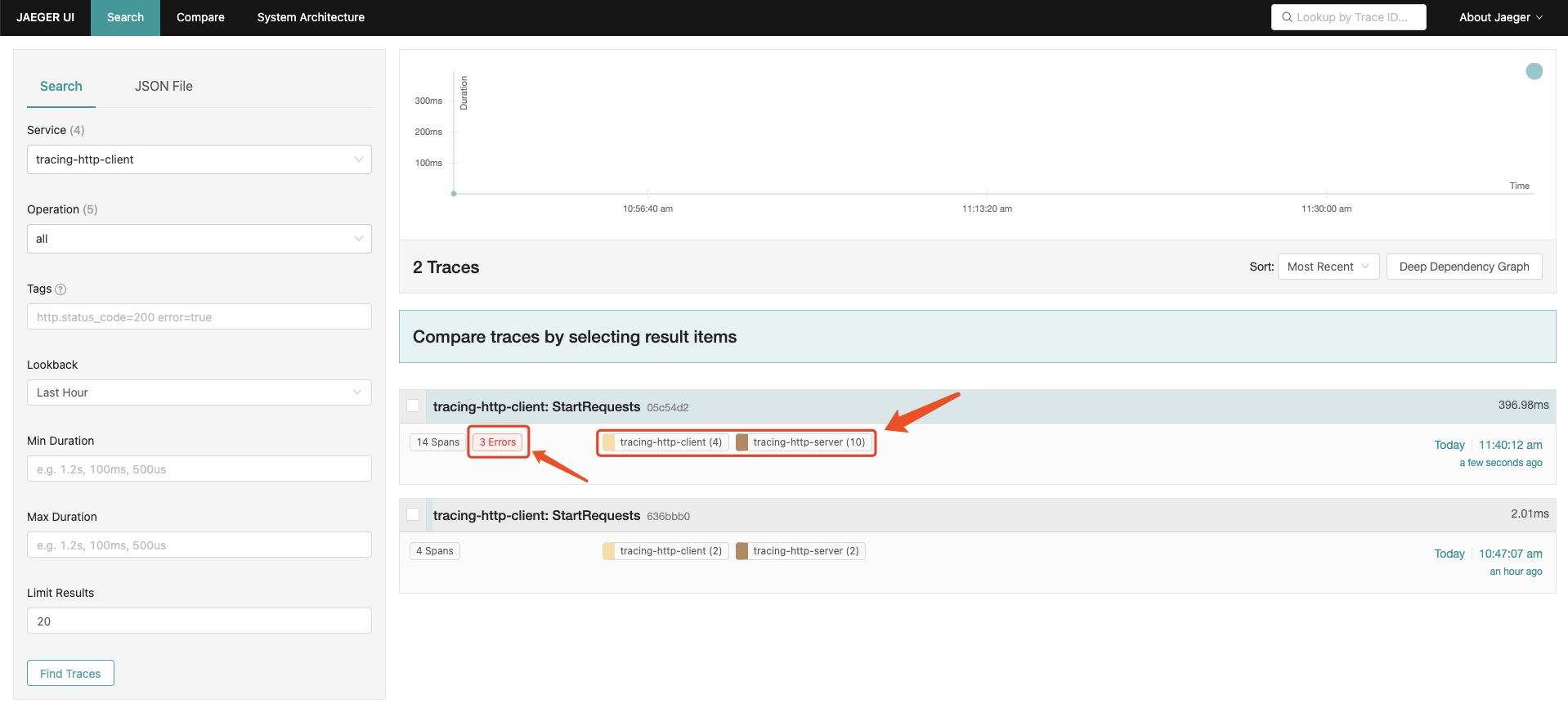
As you can see, this request generates a total of 14 spans, with 4 spans on the client side and 10 spans on the server side. Each span represents a trace node. However, we notice that 3 errors occurred. Let's click for details to see the reasons.
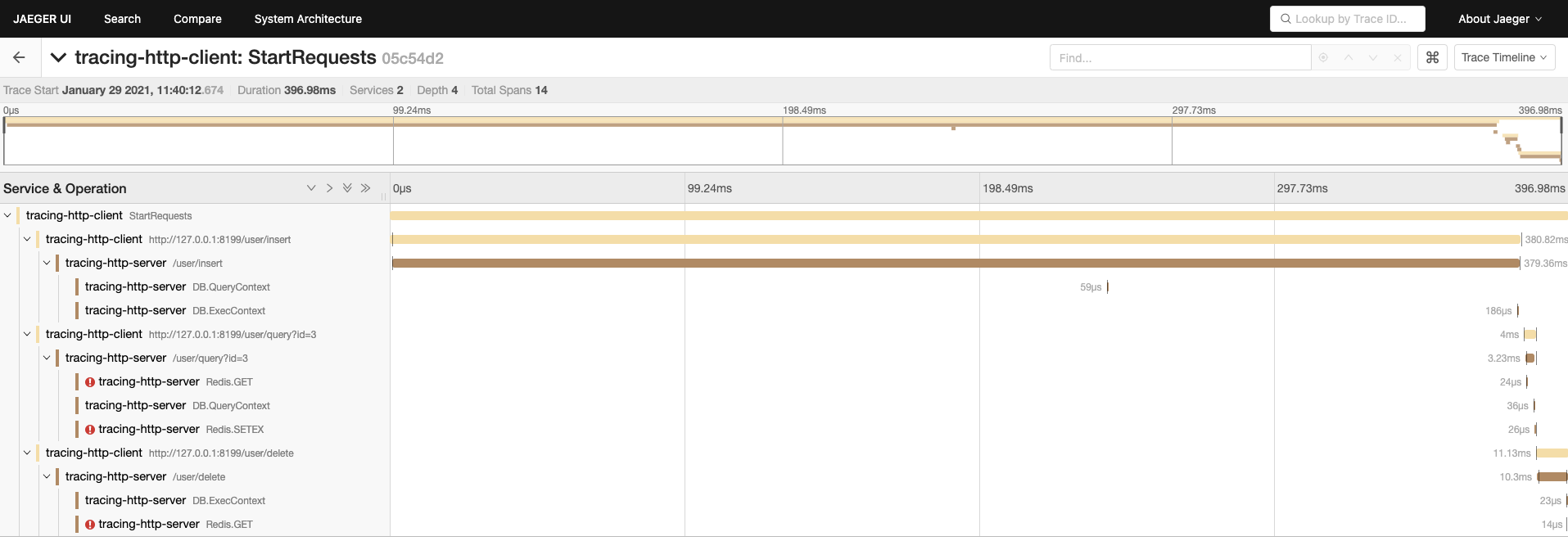
It seems that all redis operations reported errors. Let's randomly click a related redis span to check the details:
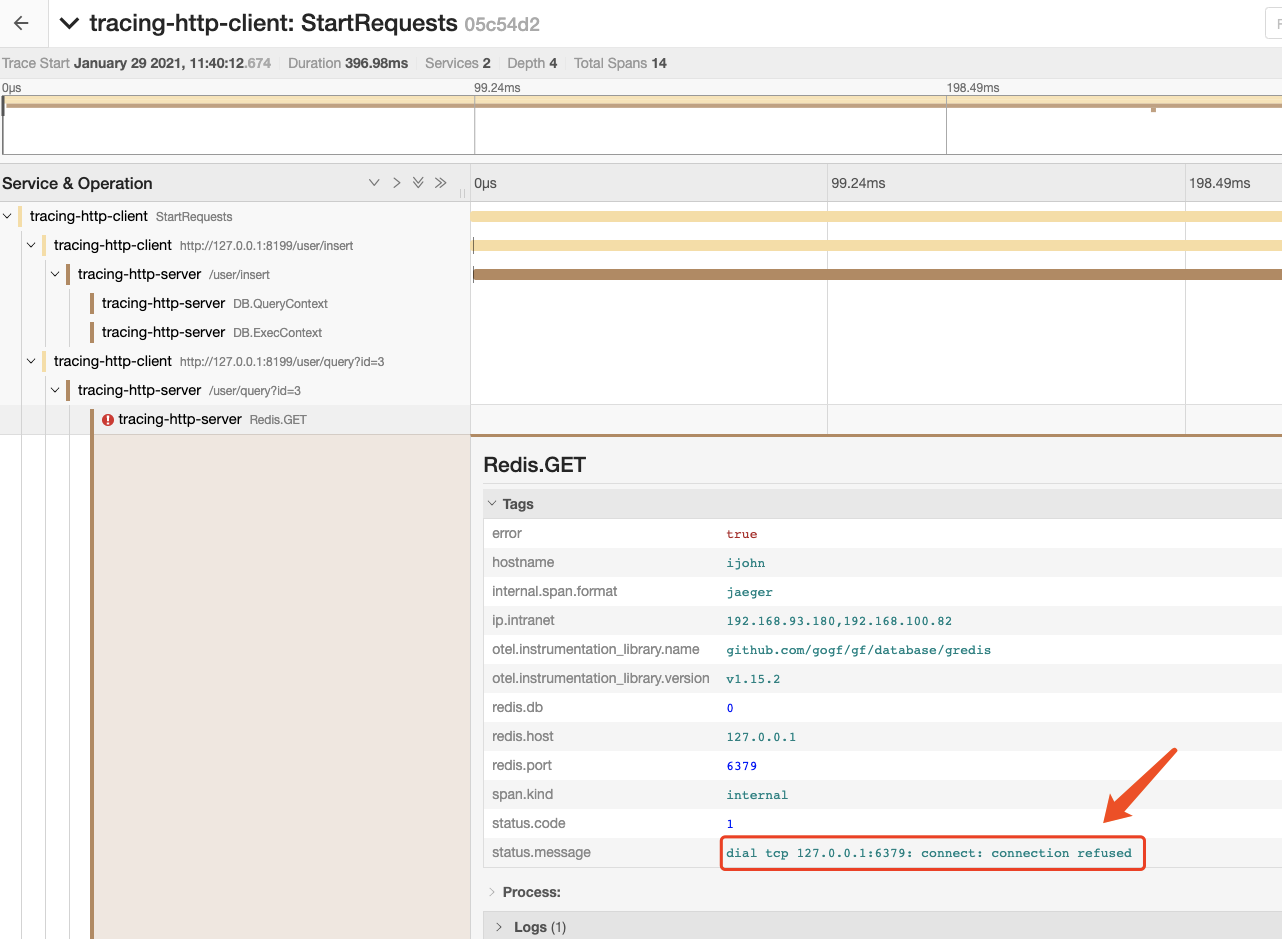
It turns out that the error was caused by the inability to connect to redis, causing all orm cache functionalities to fail. However, it didn't affect the interface logic, and all queries went through the database. This error occurred because I forgot to start the local redis server. I'll quickly start the local redis server and check the results again:
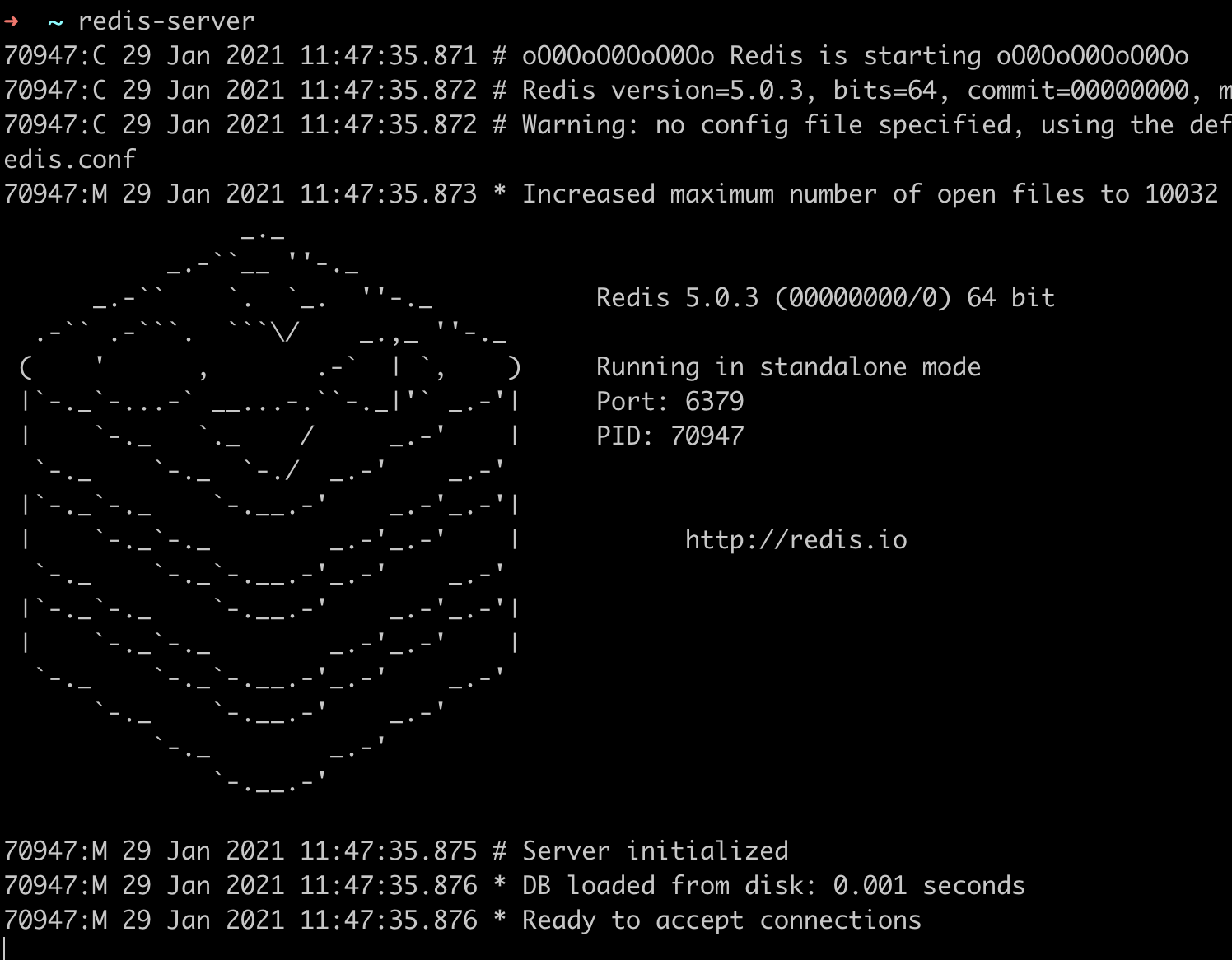
Now let's run the client code above again and check jaeger:

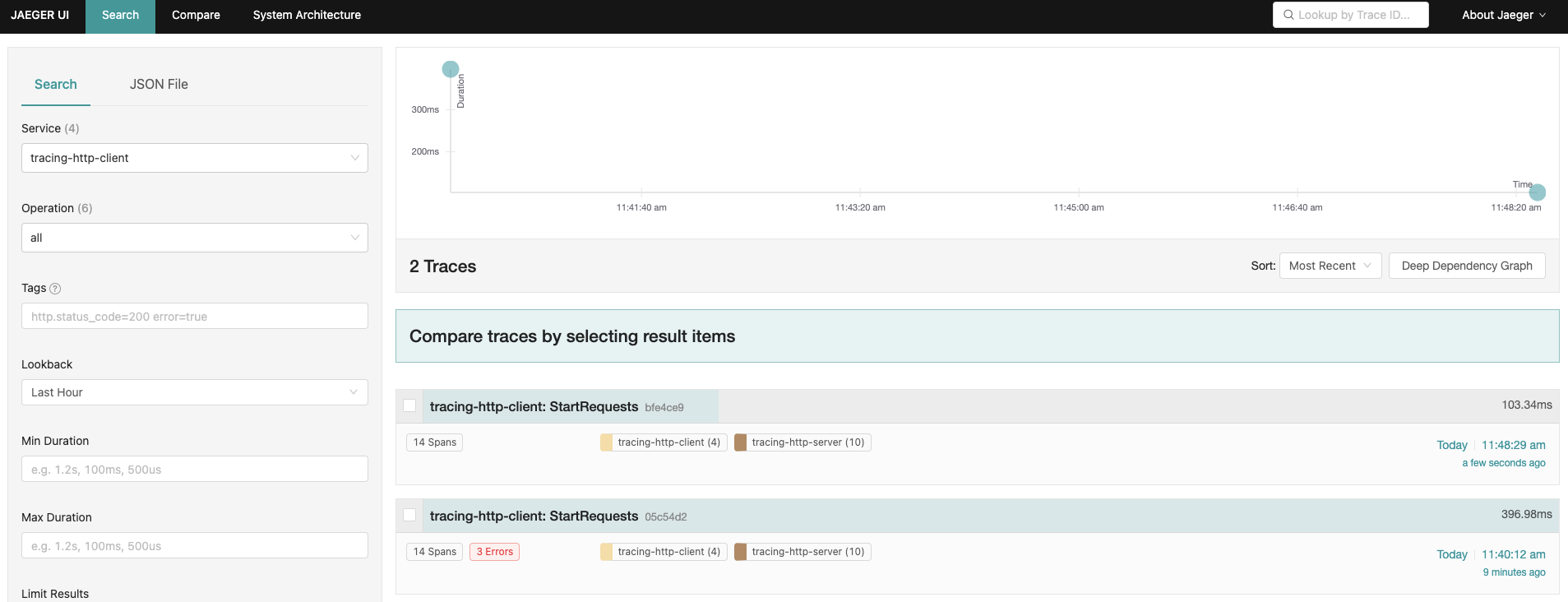
No errors this time.
The HTTP Client&Server, Logging components have been introduced before, so here we mainly focus on the tracing information of the orm and redis components.
ORM Tracing Information
Attributes/Tags
Let's randomly click an ORM trace Span and look at the Attributes/Tags information:
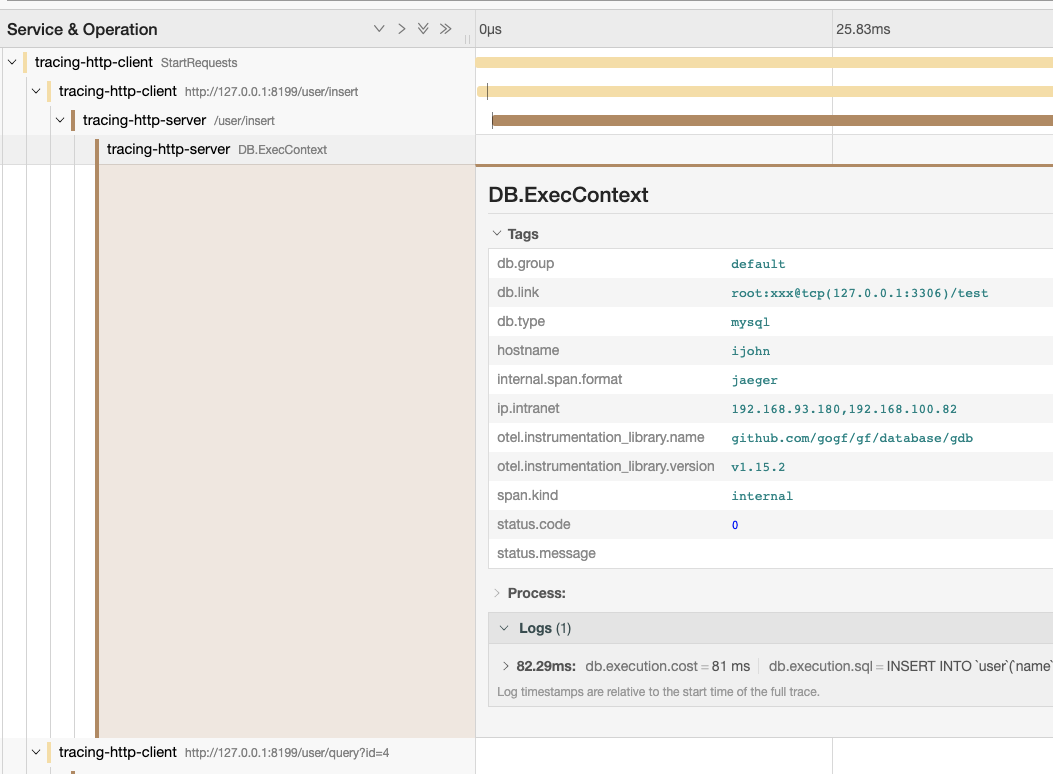
We can see that the span.kind here is internal, which is a method internal span type introduced before. Many Tags here have been introduced before, so we'll mainly introduce database-related Tags:
| Attribute/Tag | Description |
|---|---|
db.type | Database connection type, such as mysql, mssql, pgsql etc. |
db.link | Database connection information. The password field is automatically hidden. |
db.group | Database group name in the configuration file. |
Events/Process
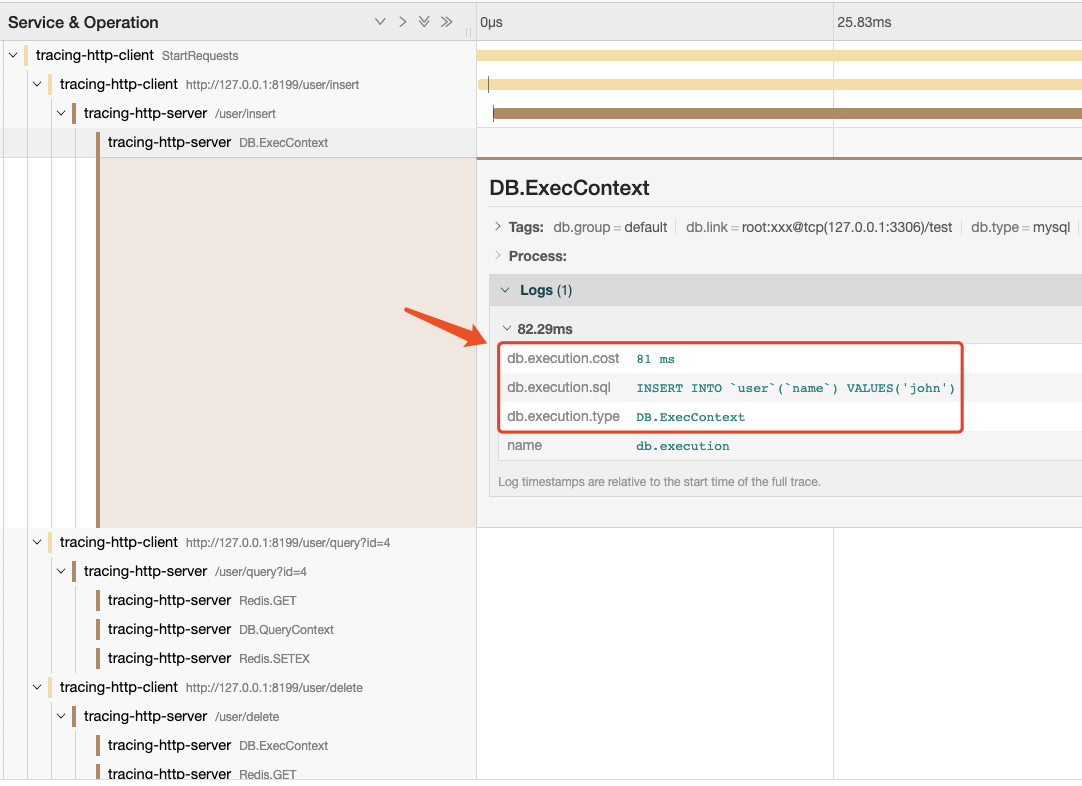
| Event/Log | Description |
|---|---|
db.execution.sql | The specific SQL statement executed. Since the ORM bottom layer is pre-processed, this statement is automatically concatenated for easier viewing and is for reference only. |
db.execution.type | The type of SQL statement executed, commonly DB.ExecContext and DB.QueryContext, representing write and read operations, respectively. |
db.execution.cost | Execution time of the current SQL statement, measured in milliseconds (ms). |
Redis Tracing Information
Attributes/Tags
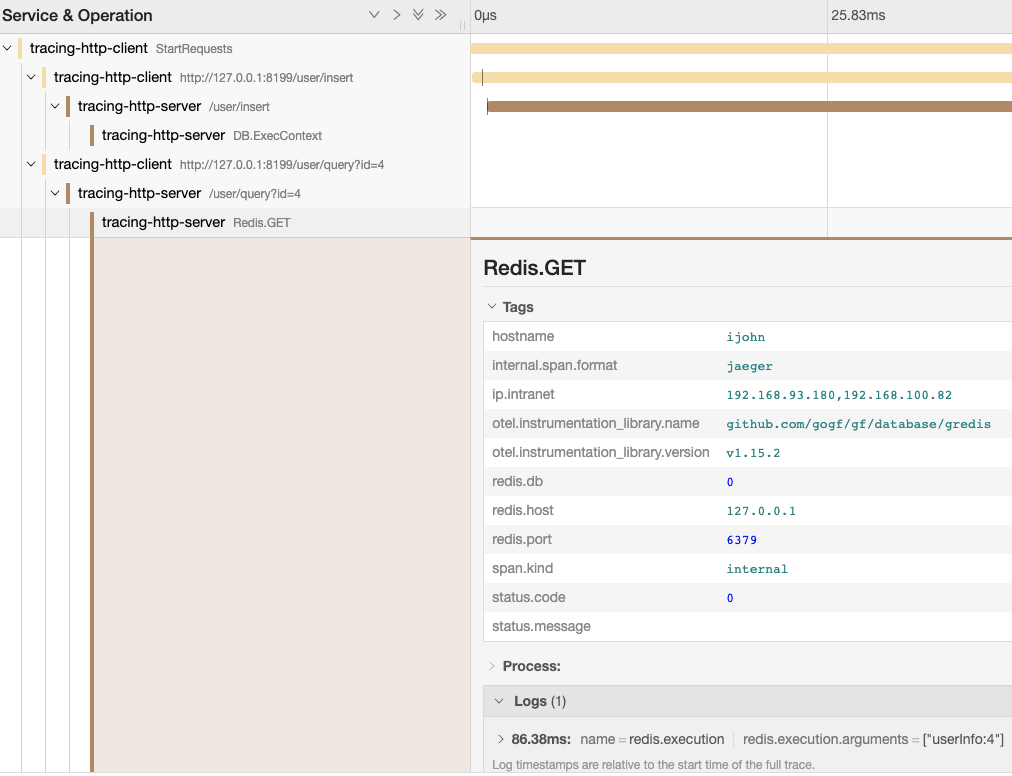
| Attribute/Tag | Description |
|---|---|
redis.host | Redis connection address. |
redis.port | Redis connection port. |
redis.db | Redis operation db. |
Events/Process
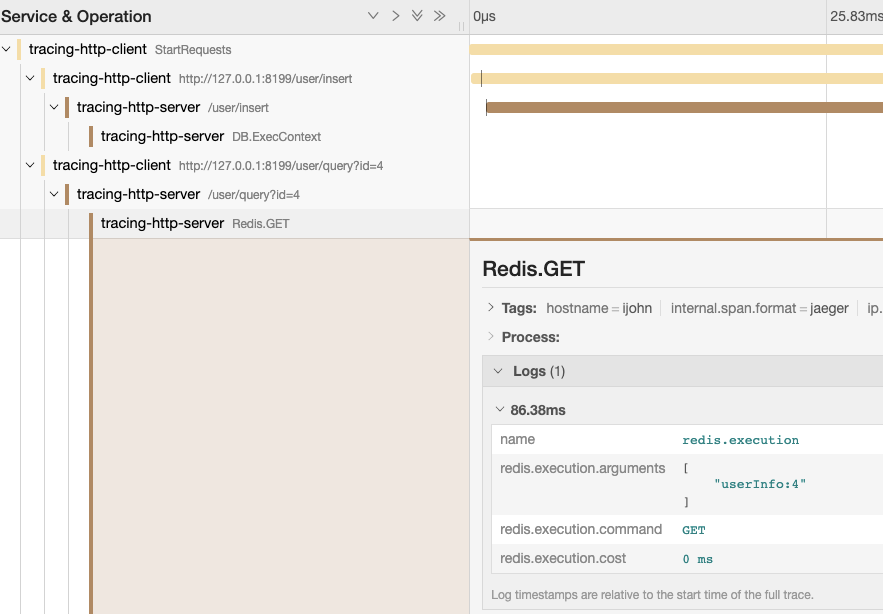
| Event/Log | Description |
|---|---|
redis.execution.command | Redis execution command. |
redis.execution.arguments | Redis execution command arguments. |
redis.execution.cost | Execution time of the Redis command, measured in milliseconds (ms). |