baggage Link Data Transmission
baggage transmits custom information between links (between services).
Example code address: https://github.com/gogf/gf/tree/master/example/trace/http
Client
package main

import (
    "github.com/gogf/gf/contrib/trace/otlphttp/v2"
    "github.com/gogf/gf/v2/frame/g"
    "github.com/gogf/gf/v2/net/gtrace"
    "github.com/gogf/gf/v2/os/gctx"
)

const (
     serviceName = "otlp-http-client"
    endpoint    = "tracing-analysis-dc-hz.aliyuncs.com"
    path        = "adapt_******_******/api/otlp/traces"
)

func main() {
    var ctx = gctx.New()
    shutdown, err := otlphttp.Init(serviceName, endpoint, path)
   if err != nil {
        g.Log().Fatal(ctx, err)
    }
    defer shutdown()

    StartRequests()
}

func StartRequests() {
    ctx, span := gtrace.NewSpan(gctx.New(), "StartRequests")
    defer span.End()

    ctx = gtrace.SetBaggageValue(ctx, "name", "john")

    content := g.Client().GetContent(ctx, "http://127.0.0.1:8199/hello")
    g.Log().Print(ctx, content)
}
Brief explanation of client code:
- First, the client also needs to initialize
Jaegerthrough thejaeger.Initmethod. - Then, using
gtrace.SetBaggageValue(ctx, "name", "john"), abaggageis set, which will be transmitted in all links of the request. However, in this example, there are only two nodes, so thebaggagedata will only be transmitted to the server. This method will return a newcontext.Contextvariable, which we will need to pass in the subsequent call chain. - Here, an HTTP client request object is created using
g.Client(), which automatically enables tracing features without requiring developers to explicitly call any methods or settings. - Finally,
g.Log().Print(ctx, content)is used to print the server's return content, wherectxis used to pass link information to the logging component. If thectxcontext object contains link information, the logging component will automatically include theTraceIdin the log content.
Server
package main

import (
    "github.com/gogf/gf/contrib/trace/otlphttp/v2"
    "github.com/gogf/gf/v2/frame/g"
    "github.com/gogf/gf/v2/net/ghttp"
    "github.com/gogf/gf/v2/net/gtrace"
    "github.com/gogf/gf/v2/os/gctx"
)

const (
     serviceName = "otlp-http-server"
    endpoint    = "tracing-analysis-dc-hz.aliyuncs.com"
    path        = "adapt_******_******/api/otlp/traces" )

func main() {
    var ctx = gctx.New()
    shutdown, err := otlphttp.Init(serviceName, endpoint, path)
    if err != nil {
        g.Log().Fatal(ctx, err)
    }
    defer shutdown()

    s := g.Server()
    s.Group("/", func(group *ghttp.RouterGroup) {
        group.GET("/hello", HelloHandler)
    })
    s.SetPort(8199)
    s.Run()
}

func HelloHandler(r *ghttp.Request) {
    ctx, span := gtrace.NewSpan(r.Context(), "HelloHandler")
    defer span.End()

    value := gtrace.GetBaggageVar(ctx, "name").String()

    r.Response.Write("hello:", value)
}
Brief explanation of server code:
- Of course, the server also needs to initialize
Jaegerthrough thejaeger.Initmethod. - The server starts with tracing enabled, and developers do not need to call any methods or configure any settings explicitly.
- The server uses
gtrace.GetBaggageVar(ctx, "name").String()to obtain thebaggageinformation submitted by the client and converts it to a string for return.
View the Effects
Start the server:
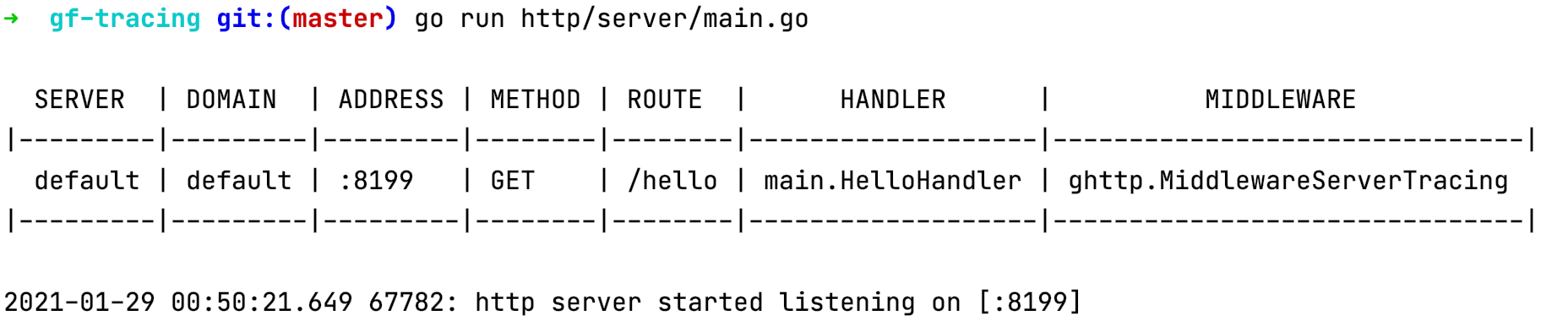
Start the client:

As you can see, the baggage submitted by the client has been successfully received and printed by the server. Also, the client outputs the TraceId information when logging. TraceId is a unique ID for a link, and it can be used to retrieve all log information for that link as well as query the detailed call chain on the Jaeger system.
View the link information on Jaeger:
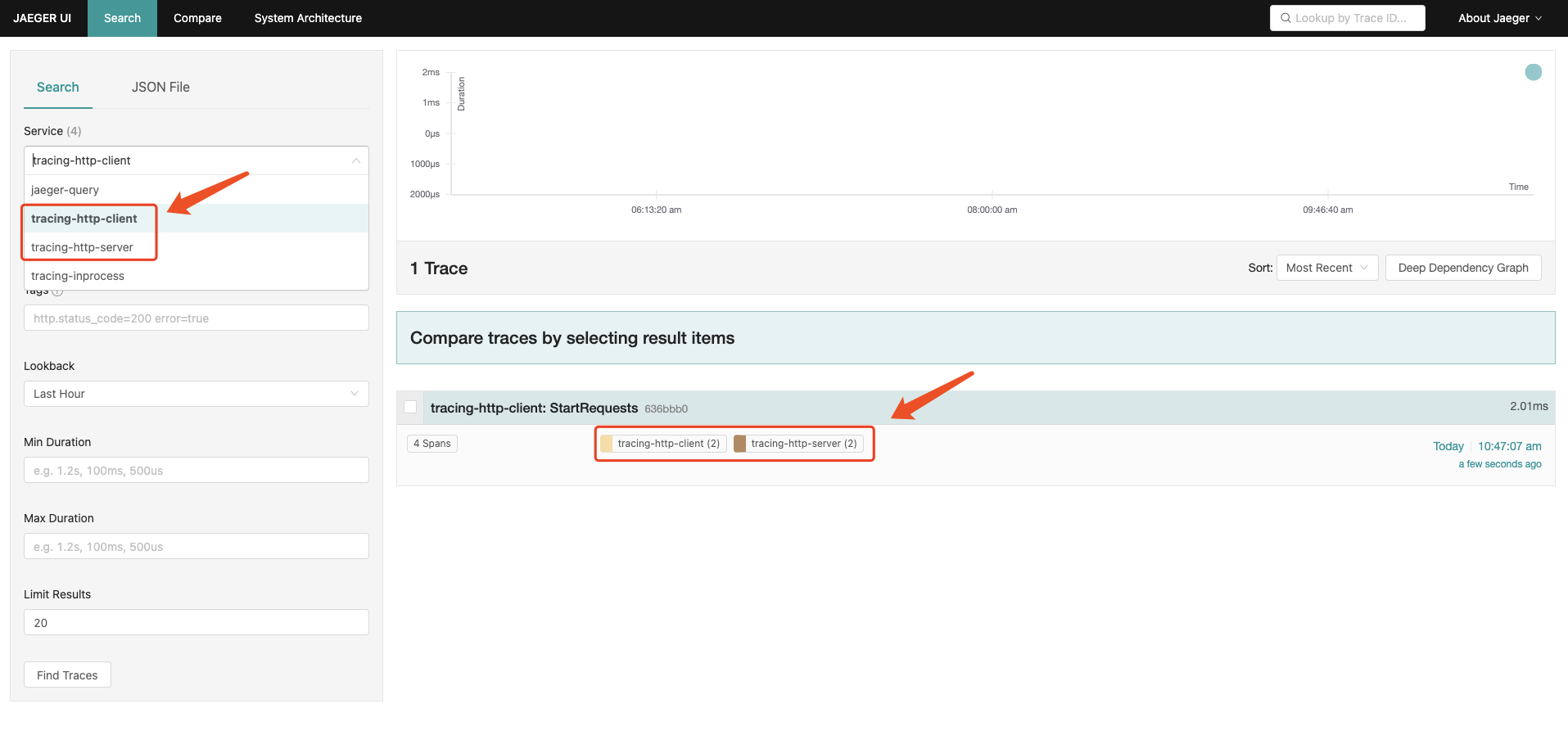
As seen here, there are two service names: tracing-http-client and tracing-http-server, indicating that this request involves two services, specifically the HTTP request client and server, and each service involves 2 span link nodes.
When clicking on the details of this trace, you can see the hierarchical relationship of the call chain. Additionally, you can find the client's request address, the server's received route, and the server route function names. Let's introduce the Attributes and Events information of the client, or the Tags and Process information shown in Jaeger.
HTTP Client Attributes
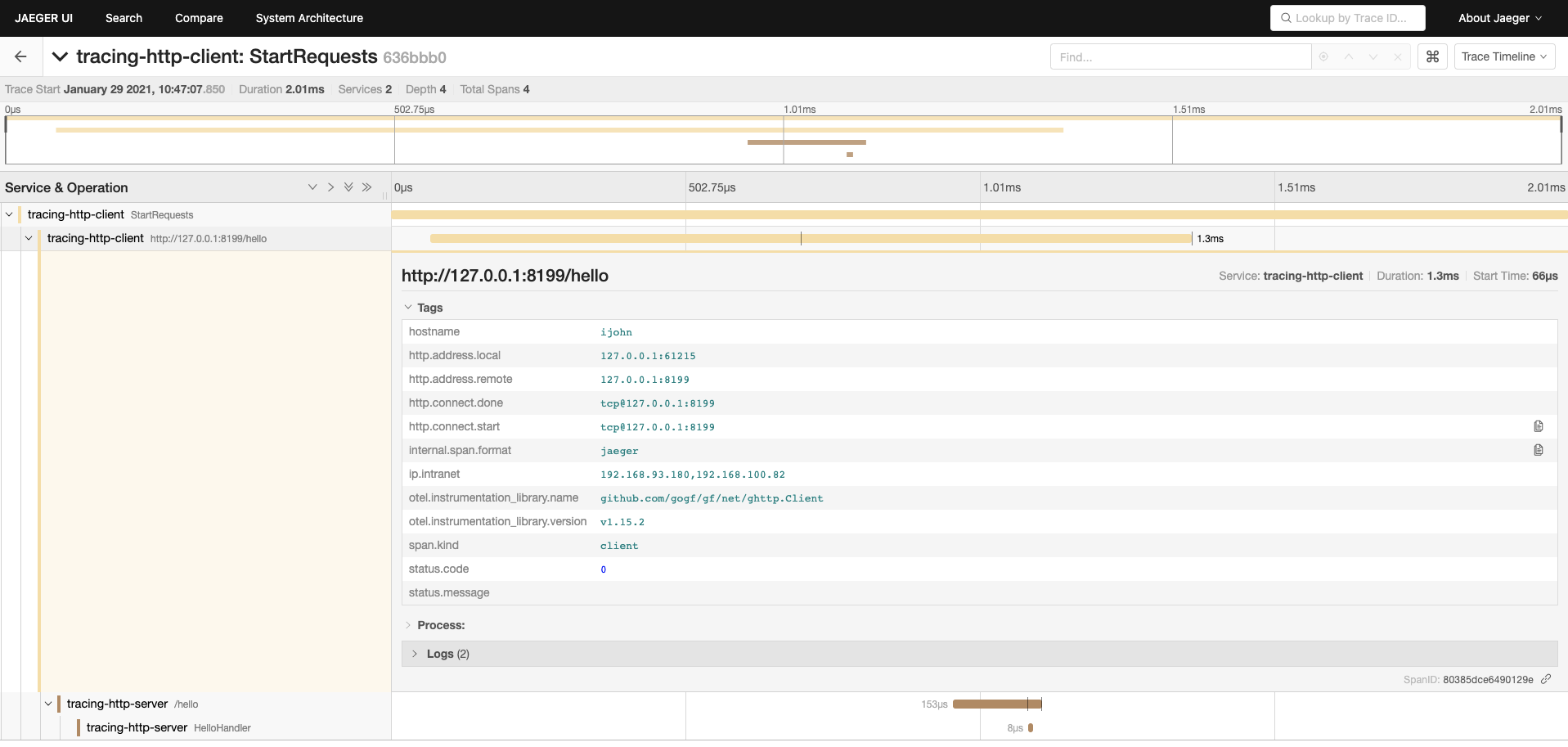
| Attribute/Tag | Description |
|---|---|
otel.instrumentation_library.name | Current instrument name, usually the component name of the current span operation |
otel.instrumentation_library.version | Current instrument component version |
span.kind | Type of the current span, generally written by the component automatically. Common span types include: |
| Type | Description |
|---|---|
client | Client |
server | Server |
producer | Producer, commonly used in MQ |
consumer | Consumer, commonly used in MQ |
internal | Internal method, generally used in business |
undefined | Undefined, rarely used |
status.code | Current span status, 0 is normal, non-zero indicates failure |
status.message | Current span status information, often contains error information when failed |
hostname | Hostname of the current node |
ip.intranet | Intranet address list of the current node |
http.address.local | Local address and port of HTTP communication |
http.address.remote | Target address and port of HTTP communication |
http.dns.start | Domain name address to resolve when the target address of the request contains a domain name |
http.dns.done | IP address after domain name resolution when the request target address contains a domain name |
http.connect.start | Type and address where connection creation starts |
http.connect.done | Type and address after successful connection creation |
HTTP Client Events
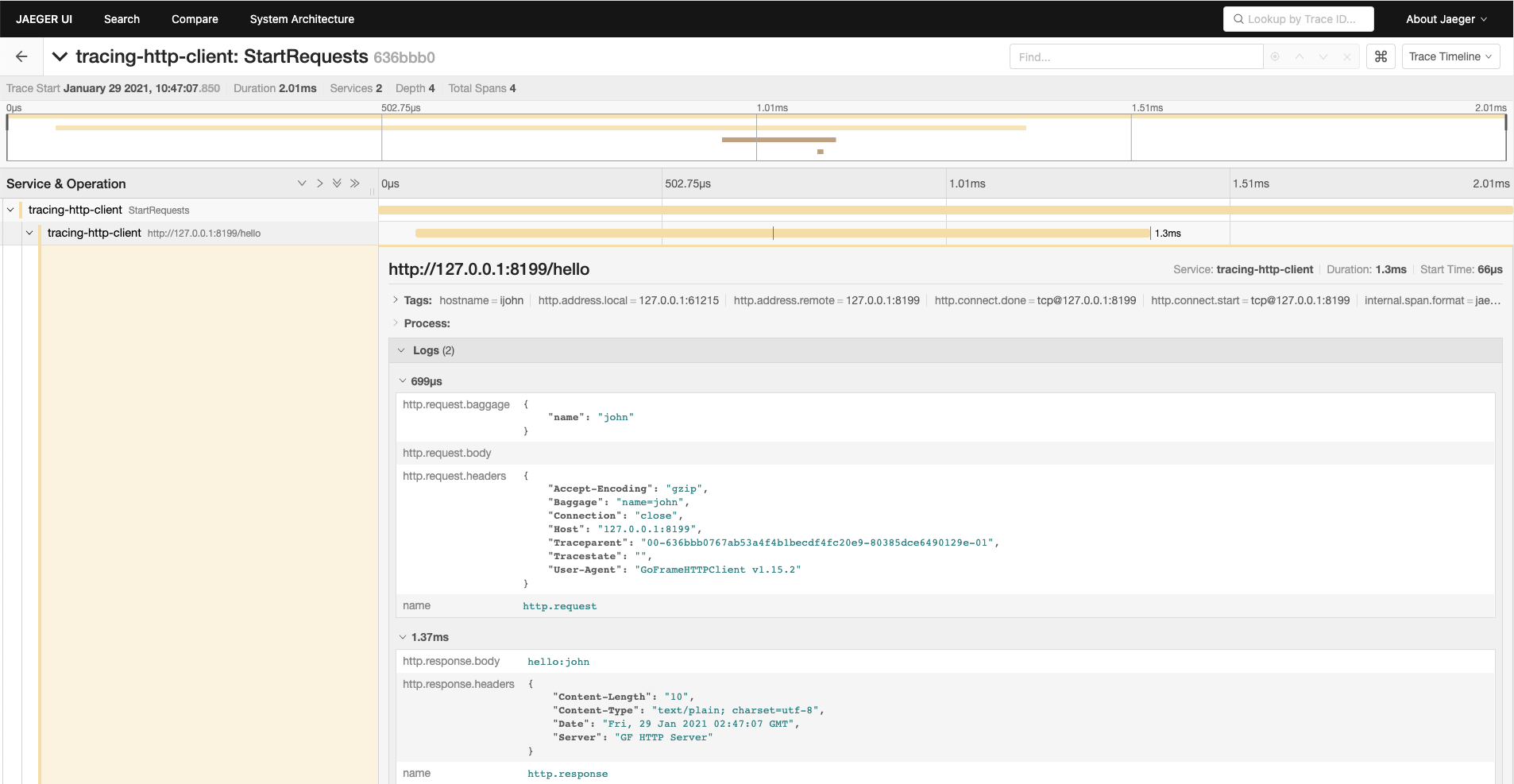
| Event/Log | Description |
|---|---|
http.request.headers | Header information submitted by the HTTP client request, which may be large. |
http.request.baggage | Baggage information submitted by the HTTP client request for inter-service link information transmission. |
http.request.body | Body data submitted by the HTTP client request, which may be large. Only records up to 512KB, exceeding which will be ignored. |
http.response.headers | Header information returned by the HTTP client request, which may be large. |
http.response.body | Body data returned by the HTTP client request, which may be large. Only records up to 512KB, exceeding which will be ignored. |
HTTP Server Attributes
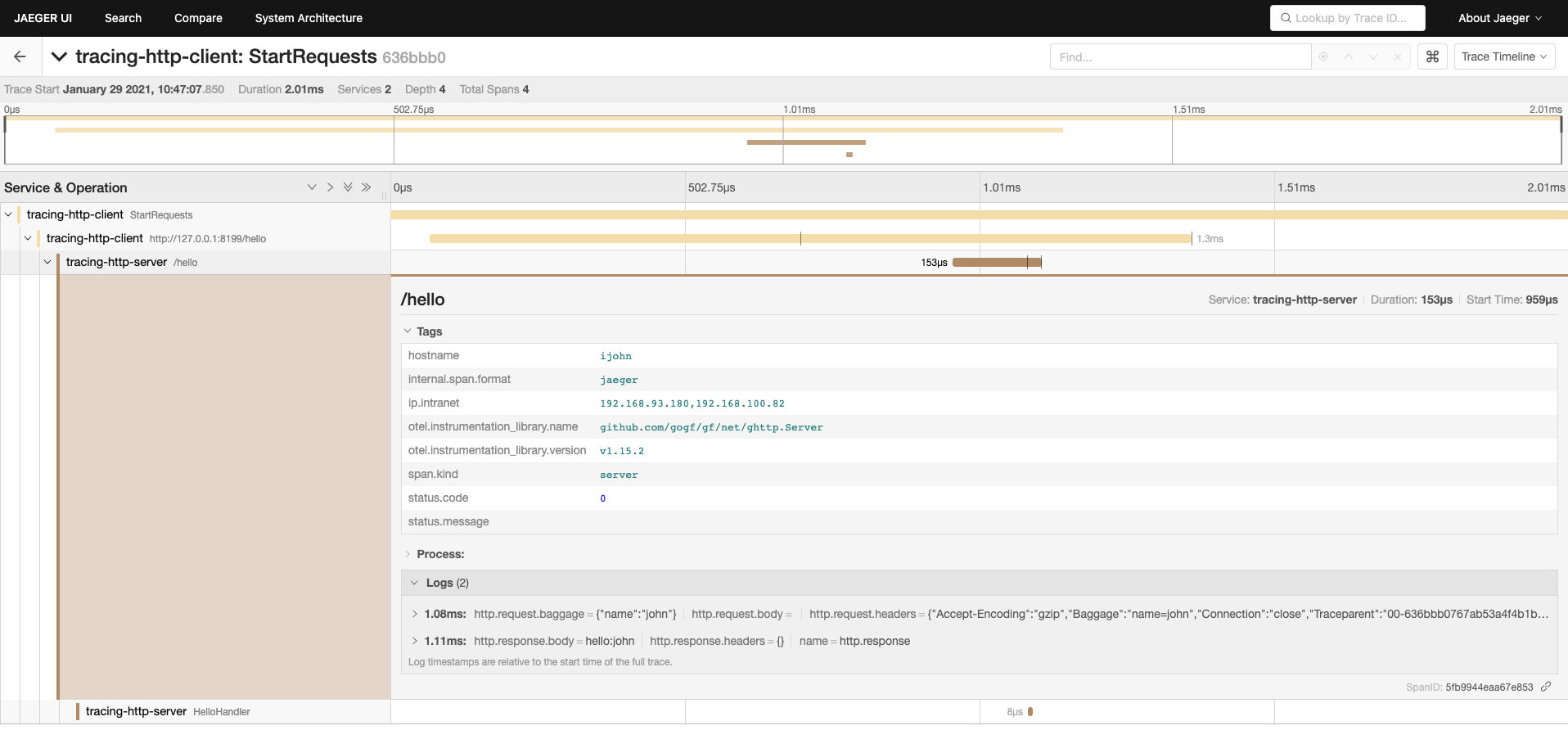
The Attributes of the HTTP Server side are the same as those of the HTTP Client, and similar data is printed in the same request.
HTTP Server Events
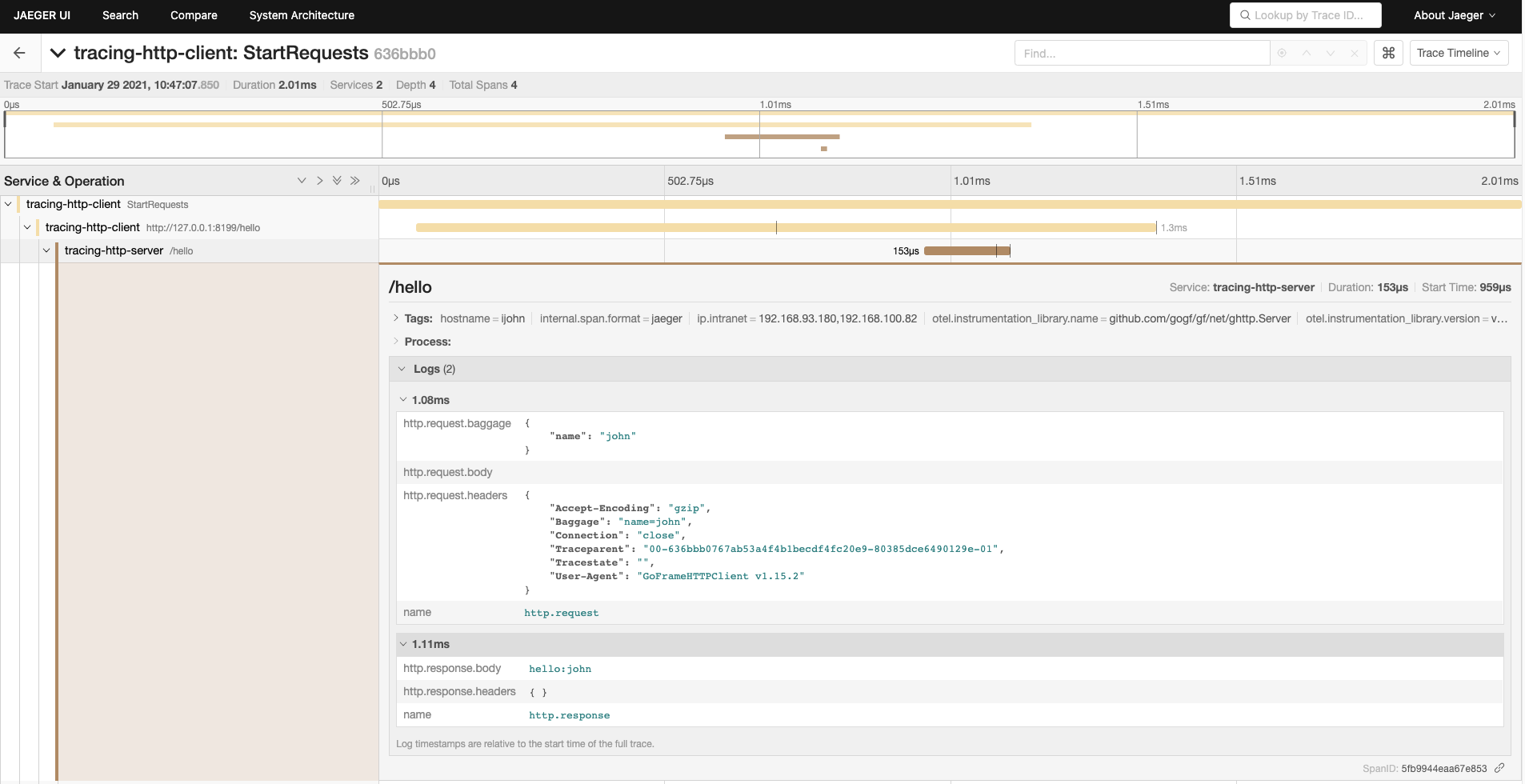
The Events of the HTTP Server side are the same as those of the HTTP Client, and similar data is printed in the same request.